Update
This Page was last updated on 20 February 2011.
Some of the code illustrated here is not present anymore in the current version - Piano Groove Tutor v 0.7. However, the excerpts are of course still valid in their own right.
This Page was last updated on 20 February 2011.
Some of the code illustrated here is not present anymore in the current version - Piano Groove Tutor v 0.7. However, the excerpts are of course still valid in their own right.
See also the pages on the latest version Piano Groove Tutor v 0.7, the earlier Piano Groove Tutor v 0.5 version and the still earlier web start version.
I have been interested in creating effective piano teaching systems for a long time now. Just browsing through the Java Midi API, it came to me that the combination of a midi file and a good score image is all one needs to create a very good practicing environment.
The "Piano Groove Tutor" has all the functionality needed to practice piano grooves - I'm talking Funk grooves, African, Salsa, etc. To put things into perspective - a lot of work goes into getting the music together in the first place. The usual sequence of events goes like this:
Once that's done that it's simply a matter of sticking the midi files
and score images into the application.
Compare this with the relatively short time I spent so far developing this
software and it's easy to see that the real value of this package
of course is the music itself.
That being said - the music will speak for itself but the software
will not; I will have forgotten how I jumped (or avoided) all the little hurdles
along the way - hence this article.
The first part will give a quick overview of what it can do, the second part
addresses the software itself.
Here is a screenshot from version 0.5
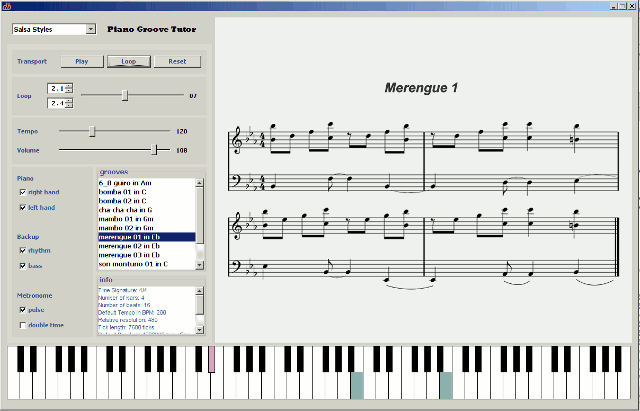
Once a session is loaded, the various grooves appear in the list. Clicking on one of the grooves will load the groove into the application. You can now select which voices you want to hear. At first you may want to practice playing the groove at very slow speed with the metronome ticking double time (the metronome is calibrated to the shortest note in the sequence). At this slow speed, the keyboard is easy to read which is good if you're not very good at sight-reading. Both left hand and right hand keys appear in different colours.
There's not much more to it - simple and effective.
This application was written in Java using the Java Sound API. Much on this can be found on the net - so I concentrate on what wasn't so easy to find as well as some pitfalls.
Most computers have an internal synthesizer (such as the MS one that comes packed with windows). Most computers also have at least one soundbank that this synthesizer uses in order to create the sounds. These 2 entities are what is needed to play midi files on the PC. Java takes advantage of this and uses the system's resources to play its midi files. Most of the development is focused on creating various tools to manipulate and analyse midi files using Java's midi API. The Java Midi Programmer's manual is very informative and not too difficult to understand (assuming you understand the Midi system), so that's a good resource to have when things get hard going (and they always do...).
First step is to look through the sample code that comes with the Java Midi package for developers. I borrowed some sections of the synthesizer class for my application which saved me developing code to draw the keyboard.
Following chapters describe some implementation issues.
Many purists snuff at the mention of Matisse, Java's automatic GUI builder - especially the inability of editing the code thus created - at least as far as the Netbeans IDE is concerned (by the way, I like using the Netbeans IDE for small to medium sized applications such as this and Eclipse for everything else that's not MS, including C, C++, javascript, php. For MS applications of course, Visual Studio is the go and C# the language.
But I digress, Matisse has some great plusses:
You need to understand a little about GroupLayout so you can manipulate the code when needed; you may not be able to edit the code manually (you can use the graphic builder for that), but you can manipulate its components and dynamically add components as well.
Worst thing you can do is trying to understand the code that Matisse creates. Instead go and read some articles that explain it very well, like this blog.
Update 22 Jan 2009: As it turned out, since I had to make a few changes to the GUI, such as making it scaleable to different resolutions, I had to abandon using Matisse and create the code by hand. I still used the GroupLayout - which took some getting used to, but it turned out quite succesful in the end. I also delegated the GUI to its own class, which made the main class less cluttery.
The GroupLayout uses an interesting system - each of its components is described on both the horizontal and vertical plane. Here's one reason why I'm harping on about this stuff: I needed to dynamically create 3 components for each track, since each midi file has a different number of tracks. All I had created with Matisse was this panel called trackPnl for me to use as a container for these components. The following code creates the checkboxes at runtime (dynamically), adding components to the panel created previously with Matisse. The aim is to create a row of 2 labels, followed by as many rows as there are tracks, containing a label (track number) and 3 checkboxes each. [image to be added]. Following code does the deed:
JLabel soloLbl = new JLabel("solo");
JLabel showLbl = new JLabel("mute");

// create a layout for the trackPnl
javax.swing.GroupLayout trackPnlLayout = new javax.swing.GroupLayout(trackPnl);
trackPnl.setLayout(trackPnlLayout);

// handle gaps automatically
trackPnlLayout.setAutoCreateGaps(true);
trackPnlLayout.setAutoCreateContainerGaps(true);

// create hash maps for each object for easy reference
HashMap trackLblMap = new HashMap();
HashMap soloCbxMap = new HashMap();
HashMap muteCbxMap = new HashMap();

// create 3 components for each track
for(int i = 0; i < numTracks; i++)
{
   trackLblMap.put(Integer.toString(i), new JLabel("track " + i));
   soloCbxMap.put(Integer.toString(i), new JCheckBox());
   muteCbxMap.put(Integer.toString(i), new JCheckBox());
}

// 1st Parallel group for HorizontalGroup
GroupLayout.ParallelGroup pgH1 = trackPnlLayout.createParallelGroup(GroupLayout.Alignment.LEADING);
for(int i = 0; i < numTracks; i++)
{
   pgH1.addComponent((JLabel)(trackLblMap.get(Integer.toString(i))));
}

// 2nd Parallel group for HorizontalGroup
GroupLayout.ParallelGroup pgH2 = trackPnlLayout.createParallelGroup(GroupLayout.Alignment.LEADING);
pgH2.addComponent(soloLbl);
for(int i = 0; i < numTracks; i++)
{
   final int j = i;
   final  JCheckBox solo = (JCheckBox)(soloCbxMap.get(Integer.toString(i)));
   pgH2.addComponent(solo);
   solo.addActionListener(new ActionListener()
   {
      public void actionPerformed(ActionEvent e)
      {
         sequencer.setTrackSolo(j,solo.isSelected());
         keyboard.piano.unsetAllKeys();
      }
   });
}

// 3rd Parallel group for HorizontalGroup
GroupLayout.ParallelGroup pgH3 = trackPnlLayout.createParallelGroup(GroupLayout.Alignment.LEADING);
pgH3.addComponent(showLbl);
for(int i = 0; i < numTracks; i++)
{
   final int j = i;
   final  JCheckBox mute = (JCheckBox)(muteCbxMap.get(Integer.toString(i)));
   pgH3.addComponent(mute);
   mute.addActionListener(new ActionListener()
   {
      public void actionPerformed(ActionEvent e)
      {
         sequencer.setTrackMute(j,mute.isSelected());
         keyboard.piano.unsetAllKeys();
      }
    });
}

// Add all the Parallel Groups to the Horizontal Group
trackPnlLayout.setHorizontalGroup(
	trackPnlLayout.createSequentialGroup()
	.addGroup(pgH1)
	.addGroup(pgH2)
	.addGroup(pgH3)
);


// Create Vertical Groups
// There are as many vertical groups as there are tracks + header

// we need to create a SequentialGroup first so we can add the ParallelGroups to them as we go
GroupLayout.SequentialGroup sgV = trackPnlLayout.createSequentialGroup();

// First ParallelGroup for VerticalGroup
GroupLayout.ParallelGroup pgV1 = trackPnlLayout.createParallelGroup(GroupLayout.Alignment.LEADING);
pgV1.addComponent(soloLbl);
pgV1.addComponent(showLbl);
sgV.addGroup(pgV1);
// Iterate through as many ParallelGroups for VerticalGroup as there are tracks
for(int i = 0; i < numTracks; i++)
{
   GroupLayout.ParallelGroup pgV = trackPnlLayout.createParallelGroup(GroupLayout.Alignment.LEADING);
   pgV.addComponent((JLabel)(trackLblMap.get(Integer.toString(i))));
   pgV.addComponent((JCheckBox)(soloCbxMap.get(Integer.toString(i))));
   pgV.addComponent((JCheckBox)(muteCbxMap.get(Integer.toString(i))));
   sgV.addGroup(pgV);
}

// Add this sequential group to the VerticalGroup
trackPnlLayout.setVerticalGroup(sgV);
Note the use of the HashMap in the above. It seems logical to want to create some variables dynamically since I have to use them in different places in the GUI - in the setHorizontalGroup() and setVerticalGroup() discussed above. This problem is easily solved: Java doesn't do dynamic variables. People suggest trying a Hash like in
// create table to create variables dynamically
HashMap hMap = new HashMap();
for(int i = 0; i < numTracks; i++)
  hMap.put(i,"track_" + i);
// get Collection of values contained in HashMap using
Collection c = hMap.values();
//obtain an Iterator for Collection
Iterator itr = c.iterator();
... but then you still couldn't do something like
while (itr.hasNext())
  JLabel itr.next() = new JLabel("nice try");
But there is a different way of approach - using HashMaps to hold the objects (components) and their labels. Once these objects are constructed, you still can refer to them at any time:
Map hMap = new HashMap();
for(int i = 0; i < numTracks; i++)
{
  hMap.put(Integer.toString(i), new JCheckBox())
  hMap.put(Integer.toString(i), new Jlabel("track" + i))
}

JcheckBox thisCheckBox = (JcheckBox)hMap.get(Integer.toString(i));
thisCheckBox.doWhatever();  //checkbox is now associated with i.
Having worked (and still working) on a large imaging program using the Java Advanced Imaging API, it is refreshing to be able just to create an imagIcon, stick it on a label, add it to the Jpanel and be done with it.
ImageIcon img = new ImageIcon ("Images/f1.gif");
JLabel imageLbl = new JLabel(img);
javax.swing.GroupLayout scorePnlLayout = new javax.swing.GroupLayout(scorePnl);
scorePnl.setLayout(scorePnlLayout);
scorePnlLayout.setHorizontalGroup
(
  scorePnlLayout.createSequentialGroup()
    .addComponent(imageLbl)
);
scorePnlLayout.setVerticalGroup
(
  scorePnlLayout.createSequentialGroup()
    .addComponent(imageLbl)
);
As mentioned before, I borrowed the Keyboard class from the Java Midi Demo. Ironically,
this class proved to be the hardest to implement.
In the demo, one can hover over a note and the synthesizer will play the note. That's
easy to implement, just add keyListeneres, listen to the keyboard and generate your notes accordingly.
But I needed the Keyboard class for different reasons, I wanted to colour the keys each time a
NOTE-ON or NOTE-OFF event occurs in the MIDI file. There's just one problem: incredibly,
Java's Midi EventListeners DON"T LISTEN TO NOTE-ON AND NOTE-OFF EVENTS!
So I tried to work around this problem for a few days - none of the solutions I came up with could handle the midi data on the fly - as it was being played. That is, until I finally realised that the only way out was to manually create Control Events myself each time I load a midi file thus adding the extra data to the file (in memory only - the file itself doesn't get changed in the process). The advantage of this is that it can be done off-line, before you need to play them.
// Get the events of all tracks and convert them to ControlEvents
private void createControlEvents()
{
   // only the piano tracks (track 1 and 2) are used for display on the piano
   for(int j = 1; j < 3; j++)
   {
     for(int i=0; i < tracks[j].size();i++)
     {
      try
      {
        // TODO: adapt for all tracks (use listener to checkbox)
        MidiEvent event = tracks[j].get(i);
        MidiMessage message = event.getMessage();
        if(message instanceof ShortMessage)
        {
          int command = ((ShortMessage)message).getCommand();
          int data1 =((ShortMessage) message).getData1();
          int data2 = ((ShortMessage) message).getData2();
          int eventTick = (int)event.getTick();

          if((command == ShortMessage.NOTE_ON)||(command == ShortMessage.NOTE_OFF))
          {
            // channel number is same as track number
            addControlEvent(tracks[j], j, data1, data2,eventTick);
          }
        }
      }
      catch(ArrayIndexOutOfBoundsException e)
      {
        infoTxt.append("Track " + j + ": Track events out of bounds at " + i + "\n");
      }
    }
  }
}


private static void addControlEvent(Track track, int channel, int data1, int data2, int eventTick)
{
  MidiEvent event = null;
  try
  {
    ShortMessage a = new ShortMessage();
    // 176 or 0xB0 is the Command value for ControlChange
    // the channel number is the same as track number
    a.setMessage(ShortMessage.CONTROL_CHANGE, channel, data1, data2);
    event = new MidiEvent(a, eventTick);
    track.add(event);
  }
  catch(Exception e){}
}
At first, even the simplest midi applications did not want to run on my computer at work. This turned out to be so because the java JDK had java.sound files present which are apparently obsolete, but for some strange reason, Java was still trying to use them. So the solution was in just deleting all the java.sound files - don't need them anyway.
Another issue was the use of java midi applications in applets, they required you to add the following lines to the java.policy file in jre\lib\security folder:
// For Sound folder
permission java.io.FilePermission "<>", "read, write";
permission javax.sound.sampled.AudioPermission "record";
permission java.util.PropertyPermission "user.dir", "read";
Also, you can download decent sounding soundbanks from the sun website. Just stick them in the jre\lib\audio folder. The files are named soundbank.gm
 All contents
and downloads on this website (including text, images, pdf files, audio
files, and any other original works), unless otherwise noted, is
licensed by me, Dirk Bertels at dirkbertels.net © 2012, under a Creative
Commons License.
All contents
and downloads on this website (including text, images, pdf files, audio
files, and any other original works), unless otherwise noted, is
licensed by me, Dirk Bertels at dirkbertels.net © 2012, under a Creative
Commons License.