Piano Groove Tutor
Introduction
Last updated on 24 August 2009
This is the main page covering the Piano Groove Tutor application. There are 2 more pages available on this topic:
- The Piano Groove Tutor Coding issues page which discusses interesting Java coding issues encountered during development.
- The Piano Groove Tutor Webstart version. This is an earlier implementation that uses Java Webstart. It is still available for those who want to experiment with Java webstart and don't mind its limitations.
Latest version: Piano Groove Tutor version 0.5

New Features
The main advantage of this version is that you can add new sessions to it - something you can't do with the earlier Webstart version.
- Java Jar executable stand-alone version suiting most platforms.
- Expandable - newly available sessions can simply be added to the application's Sessions folder.
- Loop points can be set on any beat boundary.
- Volume control added.
- Application automatically loads sessions - no need to navigate to folders.
- The info box displays valuable information on your systems MIDI capabilities at start up.
- Application window size scaled to your system's resolution.
- Progress units displayed in beats instead of 'ticks'
As always, feel free to comment on this application by using the commenting forum at the end of this page.
Before downloading ...
Before downloading the Piano Groove Tutor, you need to take care of 2 things:
- Have a recent version Java JRE installed (version 1.6 onwards)
- Ensure that this JRE contains a soundbank. To check whether
your Java JRE contains a soundbank, go to the JRE folder (typically located at C:\Program Files\Java\
on a Windows machine) and navigate to the \lib folder. See if an \audio folder is present and whether it contains a sounbank file (.gm extension). If not, you can manually add this file yourself by downloading it from the Java Soundbank Download page.
To make it easy on yourself, you can take care of both at the same time by downloading the off-line version of JRE6. As of 22 Jan 09, the link for a Windows PC was jre-6u11-windows-i586-p.exe, but you can ensure you have the latest one by going to the Java Downloads Page and navigate to the latest JRE6 yourself. Just remember that the on-line version does not contain the soundbank while the off-line one does.
Another way to update your JRE on windows is to go to Control Panel -> Java -> update. But this doesn't guarantee you get the soundbank...
There is a Comments section at the end of this page. If you have some spare time, please use it.
Downloading and starting the Piano Groove Tutor
This stand-alone version, contains a java jar executable, an images folder, and a 'sessions' folder which in turn contains java jar archives. Each of these archives contains a set of grooves. Newly available archives (jar files) can be added to this sessions folder at any time.
On most systems, you simply double click on the executable jar to start the application.
Download the latest version of the piano Groove Tutor (876 KB): Piano Groove Tutor - version 0.5
Unzip it to a suitable location. To start the application, double click on the executable jar.
For convenience sake, in Windows, unzip it to something like Program Files\Piano Groove Tutor\ and add a link to it on your desktop.
This version contains the following sessions:
- Four of my Funk Grooves
- Jonathon Wilson's Funk Grooves I - 8 grooves
- Jonathon Wilson's Funk Grooves I - Groove 16 and 4 variations
Sessions
This section describes the sessions that are available. All new sessions and updates will be announced here. There are three sections: The first section contains sessions already included in the application, the second one contains sessions that can be downloaded separately, and the third section shows of planned sessions.
Once you downloaded a session, you can add it to your application by navigating to the folder that the Piano Groove Tutor resides in, open the sessions folder and paste the jar file into it.
Following is a list of the sessions currently available.
1 - Sessions included in the default download of the Piano Groove Tutor
Funk Grooves
A set of 4 grooves over C7. Grooves 3 and 4 have two bass lines: he LH bass line plays helper notes (my term)
i.e. they function to help the RH play accurately by filling in the beats. This is a feature you often find
in funk. These helper notes can be played silently if they don't help the music - but played at the right places, they
tend to enhance the rhythm. This session was previously called Funk Dirk.
Funk Jonathon I
Pianist/programmer Jonathon Wilson is an amazing funk player - on par with the great ones. He has devoted much time
in spreading his knowledge by posting videos on his website and youtube.
He kindly gave me permission (and encouragement) to use his music in these sessions. I converted all of Jonathon's
grooves by playing them on digital piano and recording them as midi files. Then they were edited and archived to suit
the Piano Groove Tutor. Some sessions use Jonathon's scores, some use my midi version scores.
This session contains 8 licks and grooves - all in C - from his first series How To Play A Funk Groove I.
Funk Jonathon II
This is also from Jonathon's first series How To Play A Funk Groove I. This particular groove is played
differently on each occasion in the final video of the series where Jonathon plays all the grooves.
Each of these variations sound great in their own right - so I transcribed them to include them in this session.
2 - New Sessions
To reiterate, you can only add new sessions to the v0.5 standalone version, not to the webstart version.
Funk Jonathon G
This is a collection from Jonathon's How To Play A Funk Groove II series - in G.
The first groove is the main theme - I took the liberty to add chord symbols to illustrate
its rich Jazzy harmonies. The second groove is a one bar funky piece based on the rhythm from his first series.
Grooves 3 and 4 are interesting licks from the solo section - I particularly like the 'rolls'.
Salsa Tunes I
I accumulated these grooves over the years when I was a piano player in a Salsa band. These are great examples
that showcases various Salsa styles in different keys. The combination of the characteristic clave and tumbao bass line underlines
all these styles. Getting these under your fingers will greatly enrich your musical vocabulary.
Salsa Tunes II
Continuation of Salsa tunes I.
Funk Jonathon F
Jonathon's latest Funk piece in F comprising of five 12 bar grooves, gradually increasing in 'funky-ness'. Illustrates
sophisticated patterns and highlights a lightning bass lick and a great RH lick.
3 - Coming soon
Salsa Styles
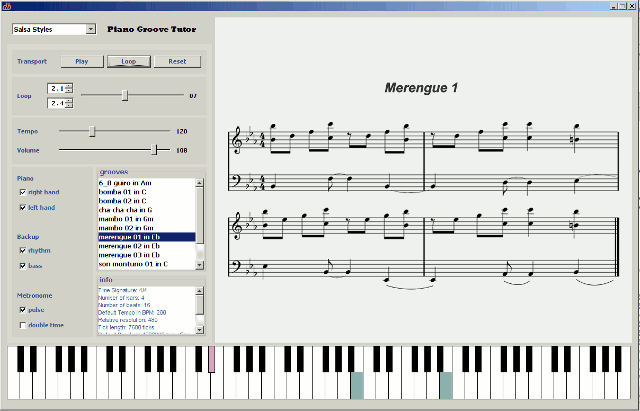
A collection of some 10 salsa tunes, each one illustrating a particular style (such as Cha-cha-cha, merengue, mambo, bomba, guiro).
These are from Rebeca Mauleon's Salsa Guidebook. The grooves are ready to go - but am waiting for permission to use them...
Blues Licks
A compilation of blues licks I accumulated over the years. They currently reside in my
Piano Diary folder but haven't been imported into the Piano Groove tutor yet.
Write a comment with a valid email address asking to be notified of new sessions and updates.
Looping issues
- Settings are from the beginning of the first field to the end of the second field; i.e. looping 1.1 to 1.4 plays the whole first bar (assuming 4/4 time signature). This may be counter-intuitive at first. It is done to avoid having something like 4.1 to 1.1 to indicate a range over the 4th bar.
- You can't loop from a late part of a groove to an early part of the same groove, i.e. loop setting 1 has to come before loop setting 2.
- The MIDI is not quantized, meaning some keys on the keyboard may not show, or show inadvertendly, at the beginning and end of a loop section. It would be easy to apply quantization, but it would be at the cost of musicality.
- You can't change the loop setting while playing. This is fixable by adding a listener - may be something for next version.
Midi issues
Your computer may not have its MIDI working properly. When the Piano Groove Tutor starts up, the info window will show your MIDI configuration. At the end of the list you should see something like
FOUND SEQUENCER: Device 6: Real Time Sequencer - false FOUND SYNTH: Device 7: Java Sound Synthesizer - falseThis means all is well. Thefalse points to the fact that no other applications are accessing these particular drivers. If you still don't have a sound, then you probably don't have a soundbank in your JRE folder. It gets confusing because you may have more than 1 JRE in your Programs Folder, and some may have a soundbank while others may not - Which JRE the application will use is not always clear, so it's easiest to copy a soundbank to all the JREs - see also the Before Downloading chapter for more on this. Luckily, the Java people have addressed this problem of multiple JREs with their latest version JRE 6. Another reason to go the whole hog and update to JRE6.
If the info window doesn't announce that it found a synth or sequencer, you have to work out why your system does not have these capabilities...
Ironically, you may have trouble when you're a developer. Developers tend to use the Java Development environment (JDK) for writing code, which comes with its own 'Runtime environment' (JRE). For some crazy reason, the JDK still has old sound libraries present, named sound.jar (if I remember correctly). These need to be deleted since they are a remnant from days gone by and interfere with sound manipulation.
Future Objectives
It would be nice to have the score in XML format. This can be done using MusicXML or JMSL with JScore. This will enable me to create XML files instead of image files. One advantage resulting from this of course is size, but there are other advantages:
- Transposing to different keys. To implement transposition now would be easy for the keyboard and midi functions, but I would need a different score (image) file for each key...
- Referencing notes on the score. Highlight the notes on the scores as they are played.
- Display other functionalities such as loop points, highlight current loop section, ...
- From: Johannes
- Date: 2009-01-25 09:29:28
Hi,looks really great. But doesnt play any audio on my system. the info text says:
Device 0: Microsoft MIDI-Mapper - false
Device 1: Microsoft GS Wavetable SW Synth - false
FOUND SEQUENCER: Device 2: Real Time Sequencer - false
FOUND SYNTH: Device 3: Java Sound Synthesizer - false
But the webstart version always had worked. Any idea?
Another suggestion is to store the last window position. my task bar is on the top and i have to move the tutor window down every time i start it.
regards
johannes
- From: Dirk
- Date: 2009-01-25 21:44:45
From the infotext, everything is right - both your system's synthesizer and sequencer are available and not used by any other programs (false). The difference with this version and the webstart one is that the webstart uses the default synth and this one uses the last one it finds, so maybe your webstart version uses the microsoft synth - did you check your java JRE has a soundbank?Your suggestion has been taken on board, I plan to store midi settings in the next version anyway, because now they reset each time you change groove.
- From: Johannes
- Date: 2009-01-25 22:46:30
Okay, this one is solved. had two java installation, one without the soundbank.In some midi files from Jonathon the right hand is one octave higher than intended. Notation is mostly one octave higher than played.
- From: Dirk
- Date: 2009-01-25 23:46:24
Regarding the notation in the Piano Groove Tutor - it is always set in the register where it is most convenient to read. When it ends up in a different register, it is indicated with an '8' above or below the clef.- From: Johannes
- Date: 2009-01-26 09:30:03
Hi, let me clarify this with an Example: groove 02 in Funk Jonathon I.If i compare it to the youtube tutorial where JOnathon plays this, the sound in the tutor is on octave too high.
Not really important, but it sounds much better. I didn't want you to change it, but just to be aware of it.
regards
johannes
- From: Dirk
- Date: 2009-01-29 00:51:45
Oh yes, I've forgotten about that - I play some of the bass lines higher up because my keys don't go that low - and also, other lines I changed register because it sounded better that way on my digital piano.- From: florence
- Date: 2009-02-14 20:59:11
thanks.hope u have a nice day- From: Daniel
- Date: 2009-04-14 15:57:43
Amazing program, and option to learn Jonathons grooves aswell.I am in heaven:)
- From: Roy
- Date: 2009-04-19 14:35:27
Fantastic stuff! A nice program with just the right tools (and great choice of grooves to learn) It'll take me ages to master just a few of these, but I'm already looking forward to more.- From: Dmitry
- Date: 2009-04-24 07:10:41
Thank you so much)Waiting for new sessions!- From: laurenced holley
- Date: 2009-05-31 04:11:10
very nice program !!! please notify me of updates and thanks for excellent learning aid- From: Kent
- Date: 2009-06-07 12:04:32
Awesome job dude (sorry to sound like a surfer).I appreciate your efforts, and those of Jonathon.
Please add me to list of notifies.
Thanks,
Kent
- From: André
- Date: 2009-07-11 12:03:10
Hello Dirk,your groove tutor (the webstart version) is absoulutely great!!
now I'm trying to get the new one but there is a problem with the sessions:
the program only shows the 3 pre-installed sessions (although I've downloaded the others too and added them to the sessions folder) - but if I click one of the sessions it won't show me its single grooves.
Can you please tell me what I'm doing wrong?
Kind regards from austria,
André
- From: Dirk
- Date: 2009-07-14 03:13:43
Glad you like the software. One of the reasons I implemented this standalone version is that it's difficult to add sessions to the webstart version (the webstart version needs to be much more secure than an installed version). I'm just saying that because I didn't make this point very clear in these pages.Assuming you've installed this new standalone version, there's no reason it shouldn't load the grooves in each session.
Just to be clear I need to know:
1: Does the application work properly without the new sessions added?
2 - Can you see all the sessions in the combobox once you added the jar files to the sessions folder (you'll need to restart the application in order to see all the sessions).
3 - Do any error messages occur in the info box?
- From: Andre
- Date: 2009-07-14 12:42:19
A few minutes ago I just removed the whole groove tutor folder and downloaded it once again ... and suddenly it worked!!I don't know why it didn't work all the time before, but who cares?! :)
I just had to download the soundbank as well -
Thanks for your help and for sharing this great program with us!!
Andre
- From: Viet To
- Date: 2009-08-11 05:31:37
Hello Dirk,Please notify me for future updates of the tutor program. Thanks very much.
Regards,
Viet To
- From: Shasta
- Date: 2009-08-23 11:38:10
Hello, great program! How do I get the - New Sessions by Jonathon Wilson to be added to the- Piano Groove Tutor with the other sessions. Can you please tell me what I'm doing wrong?Thanks,
Shasta
- From: Dirk
- Date: 2009-08-24 01:49:09
Hi ShastaI assume that you have the 0.5 version (not the webstart one because you can't add sessions to that).
Once you've downloaded a session, you will find that it is a file that ends with a '.jar' extension. All you need to do is to find the dbTutor application folders. One folder is called 'sessions'. Just stick the downloaded jar file into that (with the other jar files that are already there). Then restart the application, it should recognize the extra session(s).
Let me know how you go.
- From: shasta
- Date: 2009-08-25 07:05:35
hello, yes I have the 0.5 version, the sessions I downloaded from site are real player MIDI Audio files and PGN IMAGE for notations. These files do not look like the Jar file that came with your program. the are the other files I download: Salsa Tunes II,Funk Jonathon F,Funk Jonathon G,Funk Jonathon II,Salsa Tunes I. none is working with the program and they are not the jar file.shasta
- From: Dirk
- Date: 2009-08-26 00:36:11
Hi Shasta,Each new session you download is a jar file. This jar file does contain midi and png files, but the jar file should not be unzipped. All you need to do is to stick the jar file into the 'sessions' folder.
- From: shasta
- Date: 2009-08-29 09:19:35
when I download the sessions the image looks like a zip folder image instead of the Jar image like the three default sessions that comes with the program when downloaded. Why is that?- From: Dirk
- Date: 2009-08-30 00:51:50
Firstly, you should really be using the word 'file' instead of 'image'. Although there are different uses for the word 'image', in this context we're talking about 'files' which is a more generic term of 'a bunch of data'.If the 'hide extensions for known file types' option in start -> folder options -> view is NOT ticked, you should see that both the sessions that came with the application and new sessions are jar files (they end with a .jar extension).
Confusingly, a jar file can be lot of things: an executable, a compressed data file (like zip), or simply a storage for data.
The session files are of the latter type; they store both midi and image files for a whole session. The actual program (executable) is of the first type.
For some reason, your system sees the jar files in the sessions that came with the application differently than it sees the new session files - even though they both are of exactly the same type, i.e. they both are storages for midi files and image files.
If your program doesn't recognise the newly downloaded sessions it might be that you need to download them again (one by one).
- From: shast
- Date: 2009-08-30 20:21:01
Thanks Dirk for your patience, I have downloaded these session one at a time already. Do you mean to download. Yes the default sesisson are the an executable-jar files,but the new sessions file downloads as File Folder-type, instead of Executable Jar File that can be open via Java(TM) Platform SE. When down loading the sessions I choose save to session folder, but it do not download as a executable-jar files. i.e., I download to C:\Program Files\Piano Groove Tutor\PianoGroove and C:\Program Files\Piano Groove Tutor\PianoGrooveTutor\sessions\Funk Grooves.zip. That is what it read in properties. Do I need to download the Latest version: Piano Groove Tutor version 0.5 again?I hope we can find a solution,
shasta
- From: Dirk
- Date: 2009-08-31 02:01:29
Hi ShastThe default session files are not executables - they are exactly of the same type as the new sessions (see my previous comment), i.e. they are storage files for data, each one containing score images and midi files.
It may be easier to go through the whole process:
1 - Delete all files related to the piano groove tutor
2 - Download the whole program again from the "Downloading and starting the Piano Groove Tutor" chapter above.
3 - UNZIP it to a suitable location (in 'Program Files')
Now you have 2 folders: "images" and "sessions" and the executable jar file. You'll notice that the sessions folders contains 3 jar files.
4 - Download the new sessions, they are just more jar files, DON'T unzip them, and stick them in the "sessions" folder with the other jar files.
5 - Create a link to the executable jar file on your desktop and start the application from there.
Hope that makes it clear ...
- From: Larry
- Date: 2009-09-03 23:08:12
Dirk,Dirk,
Yee Ha! Don't know if you remember, but many months ago I tried installing Piano Tutor on my iMac with no luck. OS X was only available with JRE 1.5 and that didn't work. I just installed Snow Leopard (OS X 10.6) on my machine and now Piano Tutor works like a champ.
I haven't specifically checked, but Snow Leopard must have finally moved to JRE 1.6.
Thanks,
Larry
- From: Dirk
- Date: 2009-09-04 10:44:44
Thanks for letting us know Larry - "Snow Leopard" ... MAC does come up with some good names.- From: Matias
- Date: 2009-10-28 02:52:58
Hello Dirk!I think your software is great!. I am a Jazz Pianist and I've been playing piano for 18 years. This is the most practical and efective software I've ever known for the daily practice.
Is there any possibility of making my own sessions, creating the jar files with my own midi and pgn files?
Thanks for your patience and for sharing it.
Regards,
Matias
- From: Dirk
- Date: 2009-10-28 07:09:20
Thanks for that - I'm currently trying to implement score manipulation in java (so I don't need images). The advange would be that I can do key changes etc - but it's proven quite difficult in java.Yes you can make your own jar files - I will need to write step by step instructions for that because the midi files need to be formatted in a particular way. I will notify you when this is done (shouldn't take too long).
Comments like yours encourage me to do more work on this application -
- From: pound
- Date: 2009-11-17 11:53:36
Thank you for music- From: Schmurze
- Date: 2009-11-23 07:23:14
Hello, just to thank you for this cool software and cool salsa stuff =)The soft is simple and intuitive =)
- From: ik
- Date: 2009-12-18 04:35:05
i luv your software- From: jole
- Date: 2010-02-12 10:27:37
hi, thank you for that great tool - it makes it so much easier to learn all this fast funk stuff, i love it!just as an inspiration - a pause button would make it even more simple
great stuff!!:)
- From: Jaap
- Date: 2010-02-20 23:01:50
Hello Dirk,thank you for your great effort, must have been an awful lot of work.
As a positive input, i agree with Jole to enhance an update of this tool with a pause button, and, well, maybe some more 'How to play a funk groove I' licks?
Dank! Jaap